

- Description
- Specifications
Product Overview
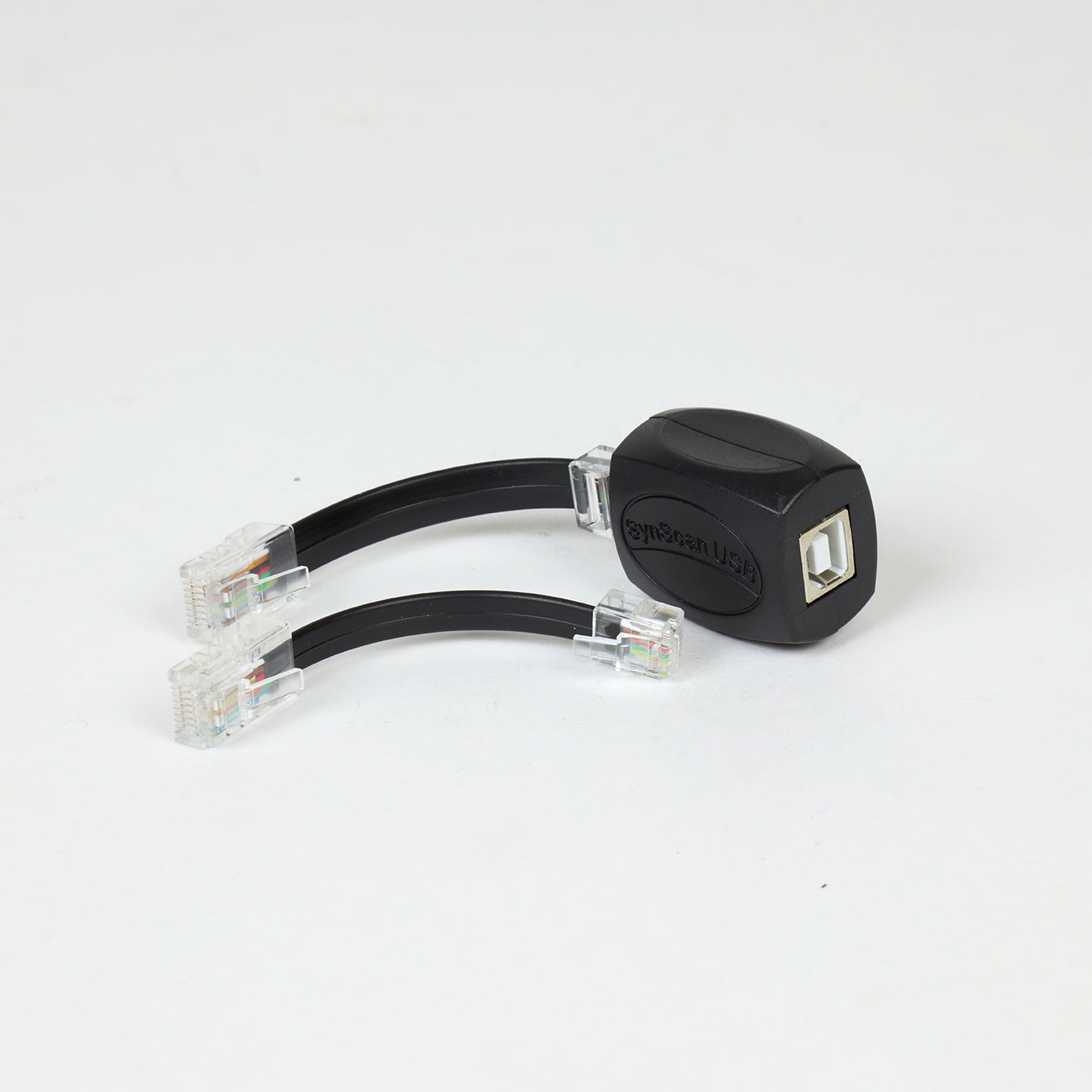
The SynScan USB Adapter puts a USB 2.0 connection onto a Sky-Watcher mount that was designed around a serial link. It plugs into the mount's hand-controller port and runs to the computer over USB, so the mount can be driven from a PC with the hand controller out of the loop entirely. Sky-Watcher supplies it with both cables it needs: 8-pin to 8-pin for EQ-series mounts and 8-pin to 6-pin for AZ mounts.
Who It's For
Owners of older SynScan mounts running a modern imaging PC. If your capture software talks to the mount through the SynScan Pro App and your laptop has no serial port — which is most laptops now — this is the piece that closes that gap without a serial-to-USB converter and its driver stack in the middle. It is also the route for anyone who wants to update the mount's motor control firmware and has been held up by the connection.
Key Features & Design
- USB 2.0 connection: the mount appears to the PC over USB rather than over an RS-232 serial link, which is what makes it workable on current laptops.
- Runs without the hand controller: the adapter connects to the mount directly, so the SynScan hand controller does not have to be in the chain for the PC to control the mount.
- Both cables included: the 8-pin to 8-pin cable covers EQ-series mounts and the 8-pin to 6-pin cable covers AZ mounts, so whichever port your mount presents, the lead is in the box.
- Works with the SynScan Pro App for Windows: that is the software Sky-Watcher names for this adapter, and it is the layer astrophotography applications talk through.
- Firmware updating: the same connection carries motor control firmware updates, which is often the reason the adapter gets bought in the first place.
Recommended Uses
- PC-controlled imaging: running the mount from capture and planetarium software through the SynScan Pro App rather than from the hand controller.
- Motor control firmware updates: connecting an older mount to a PC to apply Sky-Watcher's firmware releases.
- Simplifying the cable run: one USB lead from the observing position to the PC, with the hand controller left indoors.
- Bringing a serial-era mount onto a modern laptop: removing the need for a serial port or a third-party serial converter.
Compatibility and Accessory Notes
Sky-Watcher publishes compatibility as "most SynScan mounts" and does not print a model-by-model list. What they do specify is the connector side of it: EQ-series mounts take the supplied 8-pin to 8-pin cable, AZ mounts take the 8-pin to 6-pin cable. Between those two leads the adapter covers the standard SynScan port layouts.
The software Sky-Watcher names alongside this adapter is the SynScan Pro App for Windows. They do not publish macOS or Linux support for it, so we do not claim any.
Because the vendor's compatibility statement is a general one, the reliable way to settle it is by the mount: tell us your exact model and the year you bought it, and we will confirm which of the two supplied cables it uses and whether the adapter is the right route for what you want to run.
Good to Know Before You Order
- Compatibility is published in general terms: Sky-Watcher states "compatible with most SynScan mounts" without naming models. The two supplied cables define the practical fitment — 8-pin to 8-pin for EQ, 8-pin to 6-pin for AZ.
- Windows is the published platform: the SynScan Pro App for Windows is the software Sky-Watcher names for this adapter; no other operating system is listed.
- It replaces the hand controller in the chain, not the mount's brain: the mount's own motor control board is still doing the work; the adapter is the connection to it.
- This is a wired USB link: it is not a Wi-Fi module, so the PC sits at the end of a USB cable from the mount.
- No spec sheet is published: beyond USB 2.0, the two cables and the SynScan Pro App reference, Sky-Watcher publishes no dimensions, cable lengths or electrical figures for this adapter.
Frequently Asked Questions
Is it difficult to set up?
No. The correct cable goes from the adapter to the mount's port, a USB lead goes from the adapter to the PC, and the SynScan Pro App connects to it. There is no alignment or configuration on the adapter itself.
Which cables come with it?
Two: 8-pin to 8-pin for EQ-series mounts and 8-pin to 6-pin for AZ mounts. Both are included.
Do I still need the hand controller?
Not for PC control. Sky-Watcher's point with this adapter is that it connects to the mount directly, so the hand controller can stay out of the chain.
Can I use it to update firmware?
Yes — Sky-Watcher lists updating the mount's motor control firmware as one of its purposes.
Will it work with my mount?
Sky-Watcher's published statement is "most SynScan mounts." Send us your model and we will confirm which cable it uses and that the adapter is the right part for it.
Bottom Line
A USB 2.0 link between a SynScan mount and a Windows PC, supplied with both the EQ and AZ cables, that lets the mount be driven and its firmware updated without the hand controller in the chain. For an older mount and a laptop with no serial port, it is the connection Sky-Watcher publishes for the job.
| SKU | S30107 |
|---|---|
| UPC | 050234301077 |
| Type | USB mount control adapter |
| Connection type | USB 2.0 |
| Compatibility | Compatible with most SynScan mounts |
| Included cables | EQ series 8-pin to 8-pin; AZ 8-pin to 6-pin |
| Hand controller | Connects to the mount directly, without the hand controller |
| Software | SynScan Pro App for Windows |
| Other functions | Motor control firmware updating |
| Weight | 1.0 lb (454 g) |
You may also like
Recently viewed
Recent Blog Posts
View all
Your Guide Graph Is Lying to You
Read More

D-Size vs V-Size: A Complete Guide to Telescope Dovetail Systems
Read More
What Is Back Focus in Astrophotography? Telescope Reducers, Flatteners, and Spacing Explained
Read More